Kerberos Deep Dive for Administrators
Overview
If you are anything like I am, everything in this post will be things you have done to solve specific problems, researched to understand the protocol standards definitions better, or reviewed content because of the security misconfiguration concerns, but there is so much noise around these topics that this will be your one reference for the different scenarios and outcomes regarding Kerberos delegation as an administrator. If you are looking for how the protocol works, the references provide details on that, to understand configuring and using the protocol read on.
Unless otherwise stated, assume any changes will be reversed after validation steps for the section.
Prereqs
Systems
You can use the names or IP Addresses of your preference, but these are the references within screenshots or when names are mentioned.
- Domain, test.com (172.17.0.4)
- 2 servers, web1 (172.17.0.5)(Frontend), web2 (172.17.0.6)(Backend)
- Domain joined client, test2 (172.17.0.7)
Install IIS on web1 & web2
- IIS
- Defaults
- Security > Windows Authentication
- Application Development > ASP.NET
AD Objects
- misoule (Domain user)
- web1u (Example AppPool Identity)
- web1gmsa
- Group
- Web1 as member
- Service Account (Example AppPool Identity)
- Group
If you have the web1gmsa group created with web1 as a member and you have a KDS Root Key then the following will create the gMSA object.
New-ADServiceAccount -Name "web1gmsa" -DNSHostName "web1gmsa.test.com" -PrincipalsAllowedToPrincipalsAllowedToRetrieveManagedPassword "web1gmsa"
Download the sample pages on web1 & web2
These two webpages are what we will use through this post to validate how we are authenticating.
The WhoAmI page provides all the details for the current authentication on the specific server the page is accessed from.
Invoke-WebRequest https://raw.githubusercontent.com/aspnet/samples/refs/heads/main/samples/aspnet/Identity/CurrentUserInfoRetrieval/WhoAmI.aspx -OutFile C:\inetpub\wwwroot\WhoAmI.aspx
The ScrapperTest page provides an easy way to submit a request to the backend server from the frontend server.
Invoke-WebRequest https://raw.githubusercontent.com/aspnet/samples/refs/heads/main/samples/aspnet/Identity/CurrentUserInfoRetrieval/ScrapperTest.aspx -OutFile C:\inetpub\wwwroot\ScrapperTest.aspx
Event log filter on DC
You can use this to filter for successful Kerberos (Query ID 0 and 2) and NTLM (Query ID 1) authentications from the web servers
<QueryList>
  <Query Id="0" Path="Security">
    <Select Path="Security">
      *[System[(EventID=4624)]]
      and
      *[EventData[Data[@Name='IpAddress'] and (Data='172.17.0.5' or Data='172.17.0.6' or Data='172.17.0.7')]]
    </Select>
  </Query>
  <Query Id="1" Path="Security">
    <Select Path="Security">
      *[System[(EventID=4776)]]
      and
      *[EventData[Data[@Name='TargetUserName'] and (Data='misoule')]]
      and
      *[EventData[Data[@Name='Workstation'] and (Data='WEB1' or Data='WEB2' or Data='TEST2')]]
    </Select>
  </Query>
  <Query Id="2" Path="Security">
    <Select Path="Security">
      *[System[(EventID=4768) or (EventID=4769)]]
    </Select>
  </Query>
</QueryList>
Kerberos in the Wild
At this point Kerberos should just work… right?
It really depends on how you access the service though. Since we are using web pages for these requests, the Windows Internet Properties for Windows Integrated Authentication (WIA) will impact the experience.
Testing with WIA
- From Edge on Web2
- WIA SSOs
- http://localhost/whoami.aspx
- HTTP 401
- http://127.0.0.1/whoami.aspx
- http://[::1]/whoami.aspx
- http://web2/whoami.aspx
- http://web2.test.com/whoami.aspx
- WIA SSOs
Why does this work? The Windows Internet Properties controls WIA’s credential passthrough.
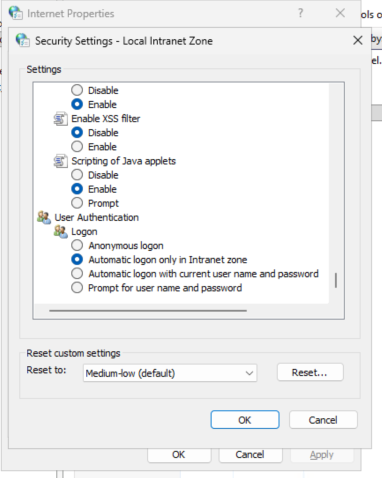
Any of these will allow WIA SSO (i.e., passthrough) by default.
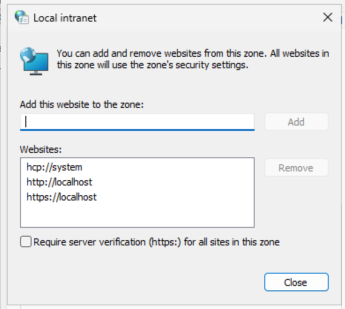
You can add one of the other examples, such as http://127.0.0.1/ to the Local intranet zone sites.
You can also disable this passthrough to see localhost fallback to NTLM. Because Kerberos NEEDS DNS.
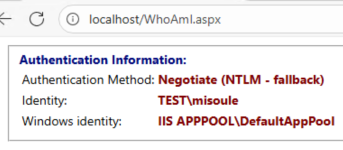
If you complete the credential prompt or allow the passthrough to work you should see the following:
Localhost will show Negotiate (Session Based)
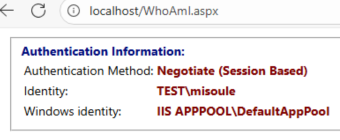
Session Based means that an authentication already occurred and was not necessary for the current load. For Localhost it will always be session based unless you disable passthrough authentication. To clear sessions, you can restart your browser or the IIS Server. You can disable sessions, https://techcommunity.microsoft.com/blog/iis-support-blog/request-based-versus-session-based-kerberos-authentication-or-the-authpersistnon/916043
Short DNS and FQDN will show Negotiate (KERBEROS)
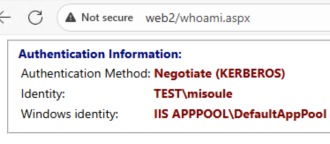
Either IPv6 or IPv4 will show Negotiate (NTLM - fallback)
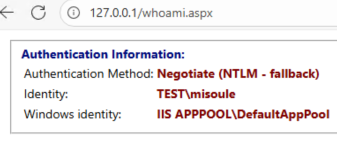
A good reminder, Kerberos requires DNS.
If we put a CNAME record in front of Web2 Kerberos works fine.
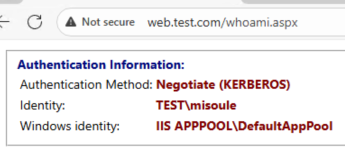
But if we use an A record authentication is not successful, because Kerberos NEEDS DNS.

If we add an SPN for our new A record then Kerberos can succeed.
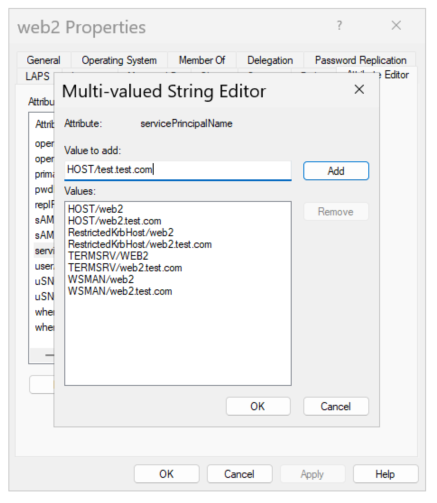
Now Kerberos is successful for our new A record.
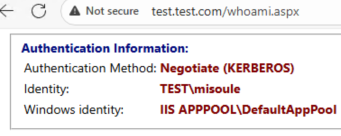
What does the HOST portion of an SPN entail… Why should you use that instead of a specific service name…
Use this PowerShell command to via what SPN service classes the HOST class aliases for:
Get-ADObject "CN=Directory Service,CN=Windows NT,CN=Services,CN=Configuration,DC=test,DC=com" -Properties spnmappings|% spnmappingsWhen I have discussed this with engineers at Microsoft, the guidance is to use HOST whenever you may be representing one of the aliased services. The intent is to make it easier to identify duplicated SPNs.
Spoiler alert… We are going to ignore this good practice to keep it simple and not require cleaning up the default HOST records for our computer objects.
What we need for Kerberos to work before getting into delegation:
- The server, web2, MUST be domain joined
- The user, misoule, MUST be a domain user
- The server, web2, MUST have DNS records registered
- Those DNS records MUST have corresponding SPNs on the object running the service
DC Logs
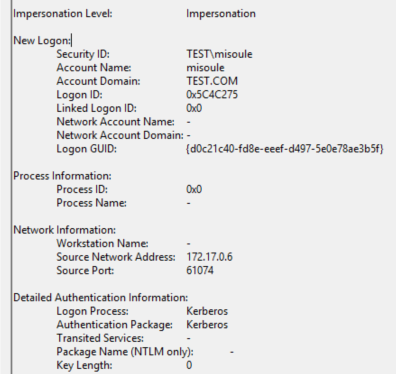
Here are some example log events:
A successful Kerberos authentication event on the DC.
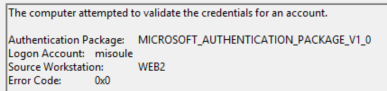
A successful NTLM authentication event on the DC.
Between Servers
You can use the scrappertest.aspx page to perform a request from web1 to web2.
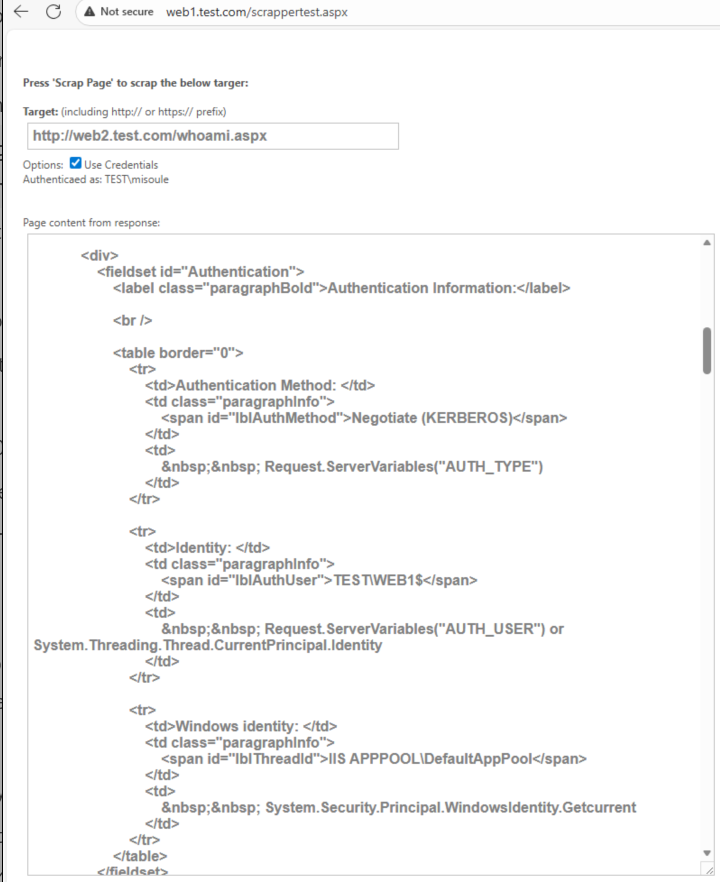
But Web2 says that the Web1 computer account is what logged in!
As we established Web2 Kerberos can be successful with credentials presented to it. Web1 is running the IIS AppPool as the DefaultAppPool, which is a virtual identity for local system. Meaning that currently Web1 is presenting it’s own system credentials when prompted to authenticate to Web2. Meaning at this point there is no delegation…
IIS AppPools & Impersonation
Do not reset this section. We will use the end state going forward.
AppPools
Lets change our AppPool identities. Just using a user account to start:
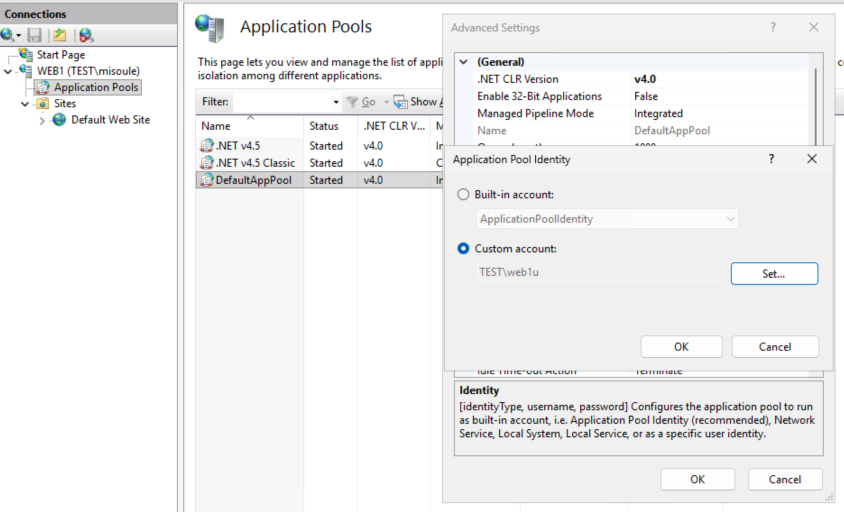
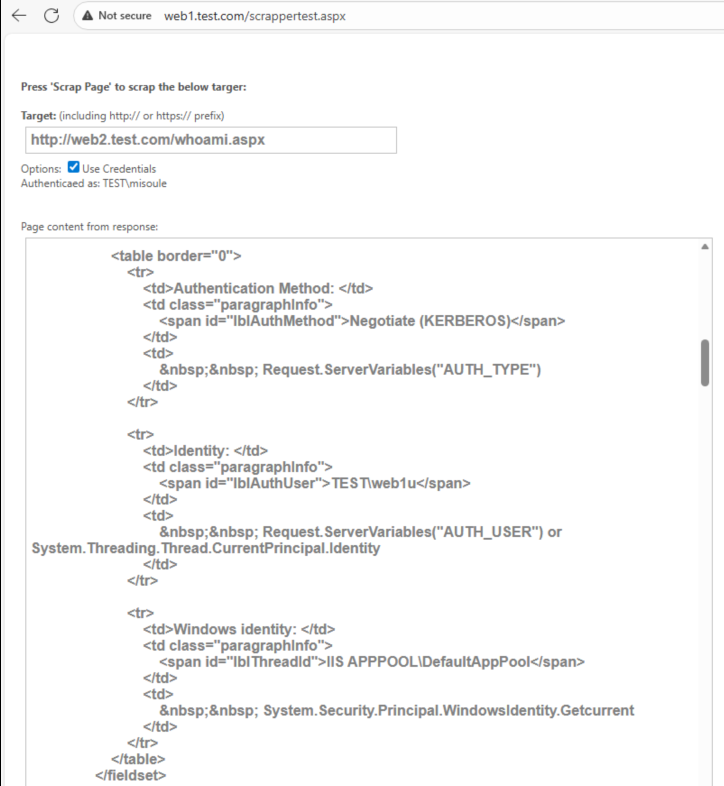
Now Web1 is presenting the web1u credentials to web2.
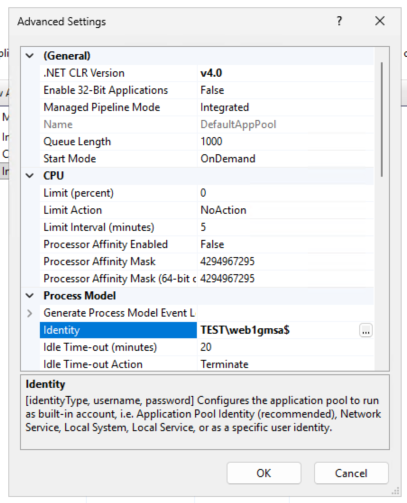
But using a user object as a service account will lead to headaches. Lets use that fancy gMSA we have.
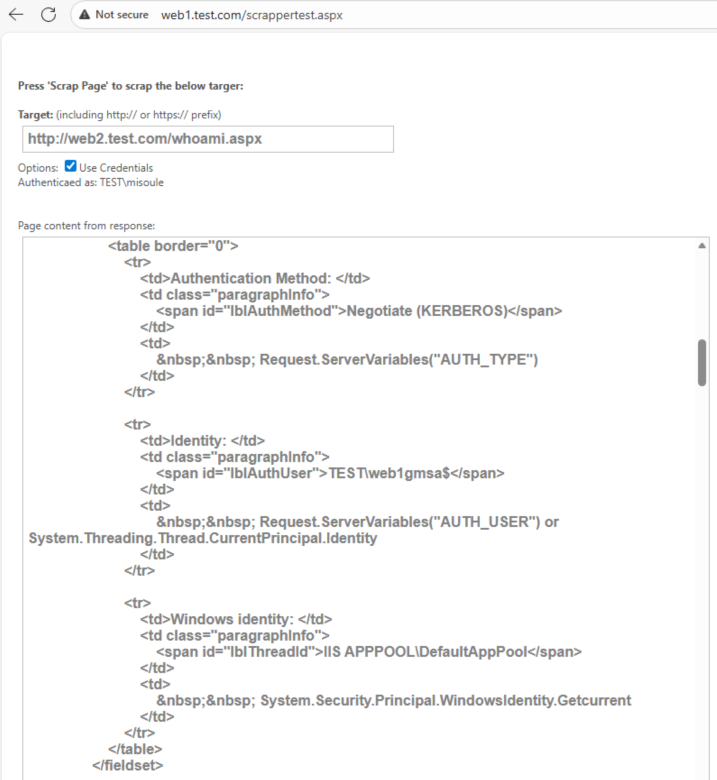
Now Web1 is presenting the web1gmsa credentials to web2. But this still isn’t delegation…
Impersonation
Are we ready for delegation yet? Yes, but first…
We need to enable impersonation on the server. Allowing the AppPool to run in the context of the user.
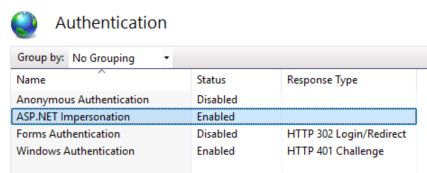
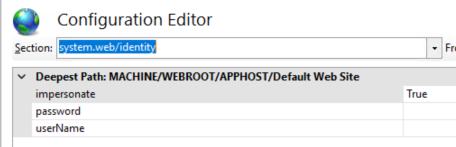
This should also enable impersonation on the web config as well.
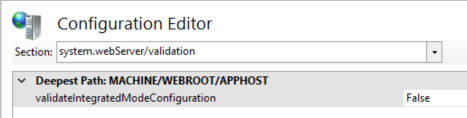
You may also need to disable integrated mode validation.
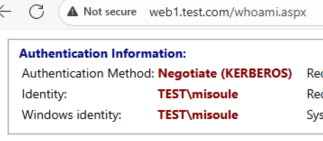
Now on Web1 we can see that our Windows identity updated.
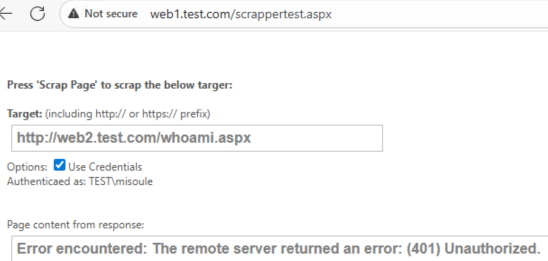
But if we try to access Web2… We get a 401 error. This is because Web1 (inclusive of web1u, local mahcine, or web1gmsa) does not have the actual credentials, it only has the Kerberos ticket that authenticated misoule into Web1. This is a good example of the “double hop” problem. Web2 does not have the user credentials and neither does Web1. Unless the ticket issued for Web1 supports Kerberos delegation, or the frontend, Web1, can present the authentication prompt from Web2 then authentication will always fail.
Unconstrained Delegation
PLEASE DO NOT DO THIS
As you will see, modern systems block this by default for good reason, and it is arguably more difficult to make work than constrained delegation options.
Summary
In simple terms: “Allow this account to use their tickets ANYWHERE in the domain.”
These steps are necessary:
- On the Domain Objects:
- Allow delegation for the account, web1gmsa, that the app is running under.
- Add an SPN to the account, web1gmsa, for the service, web1.
- On Web1:
- Configure IIS to use the app pool credentials to work with the Kerberos tickets in kernel-mode rather than the machine account.
- On the client:
- Disable Credential Guard.
- Allow unconstrained delegation in Edge.
AD Objects
This is the part that is covered most often. The account that the service, in our case the IIS AppPool, is running as, for us this is using the web1gmsa$ gMSA account. This could also be the computer account or a normal user account depending on the IIS AppPool configuration. Configure the service account domain object:
$web1gmsaSplat = @{
  Identity = "web1gmsa$"
  ServicePrincipalNames = @{
    Add = "HTTP/web1.test.com"
  }
  TrustedForDelegation = $true
}

Set-ADServiceAccount @web1gmsaSplat
IIS Server
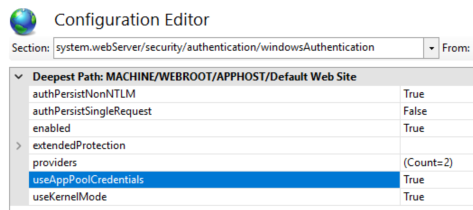
Next our IIS server configuration, on our web1 server, needs to allow the AppPool, as our AppPool identity web1gmsa, to work with Local Security Authority (LSA) rather than the local machine. This is done by setting the IIS configuration flag useAppPoolCredentials to True.
Client
Again, please do NOT do this!
Starting in Windows 11, 22H2 and Windows Server 2025, Credential Guard is enabled by default on devices which meet the requirements.
To allow unconstrained delegation the client requires Credential Guard to be disabled. You can disable the feature using the registry or group policy.
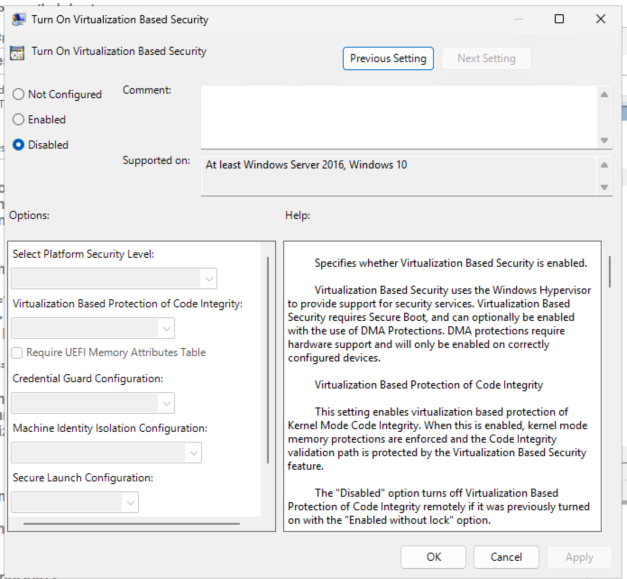
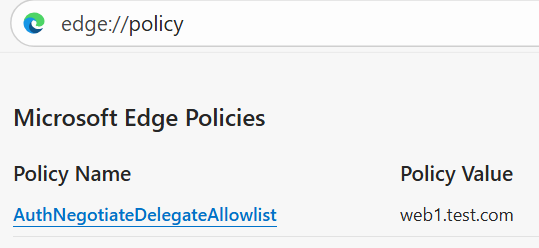
Additionally, Edge will block unconstrained delegation. You can disable this feature using the registry or group policy as well. Configure this to allow your web server, web1, as part of the allow list.
Modern browsers such as Microsoft Edge version 87 or above
New-Item -Path "HKLM:\SOFTWARE\Policies\Microsoft\Edge"
New-ItemProperty -Path "HKLM:\SOFTWARE\Policies\Microsoft\Edge" -Name "AuthNegotiateDelegateAllowlist" -Value "web1.test.com"
Testing
Now we can validate that we can authenticate to web2 as the user:
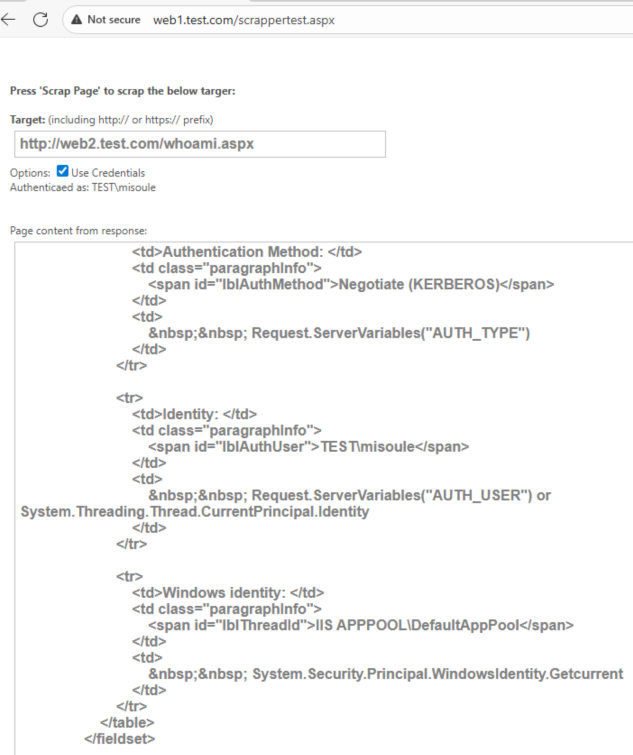
On the client system we can also run klist to validate the Kerberos ticket has the ok_as_delegate flag:

Validating using Event Log
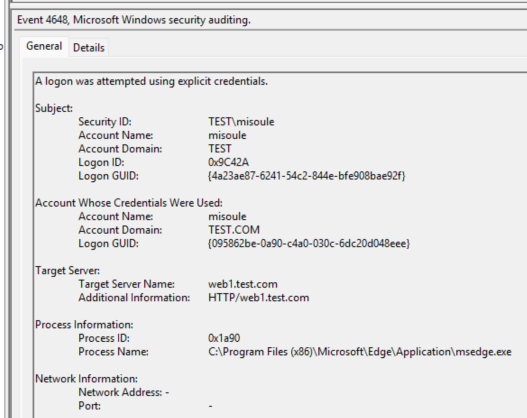
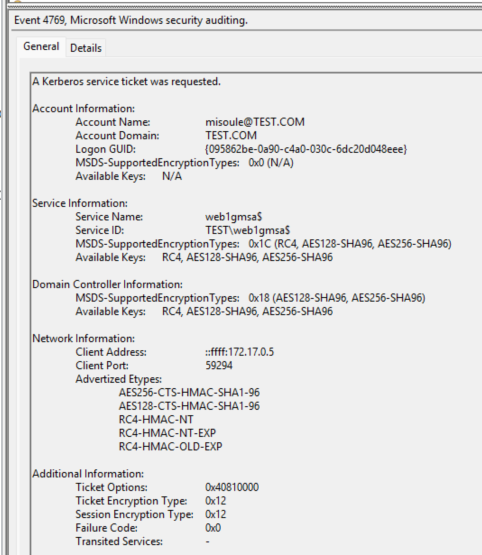
Example of the Ticket Granting Service (TGS) ticket request corelating Web1 and newDC logs:
Logon GUID: {095862be-0a90-c4a0-030c-6dc20d048eee}
Event On the client
Event On the domain controllers
Common Issues
If you get endless HTTP 401 prompts on the client:
- The SPN may not be set correctly.
- The IIS configuration useAppPoolCredentials may not be set correctly.
If the whoami page shows impersonation level impersonation rather than delegation:
- The AppPool identity may not be set as TrustedForDelegation.
- Edge may not have the server in AuthNegotiateDelegateAllowlist.
- Credential Guard may be enabled on the client.
Kerberos Constrained Delegation
Summary
In simple terms: “Allow this account to request tickets for these services on behalf of a user.”
Don’t forget to reset everything
These steps are necessary:
- On the Domain Objects:
- Allow delegation for the account, web1gmsa, that the app is running under to the backend SPN, web2.
- Add an SPN to the account, web1gmsa, for the service, web1.
- On Web1:
- Configure IIS to use the app pool credentials to work with the Kerberos tickets in kernel-mode rather than the machine account.
AD Objects
The account that the service, in our case the IIS AppPool, is running as, for us this is using the web1gmsa$ gMSA account. This could also be the computer account or a normal user account depending on the IIS AppPool configuration. Configure the service account domain object:
$web1gmsaSplat = @{
  Identity = "web1gmsa$"
  ServicePrincipalNames = @{
    Add = "HTTP/web1.test.com"
  }
  Add = @{
    "msDs-AllowedToDelegateTo" = @(
      "HTTP/web2.test.com"
    )
  }
}

Set-ADServiceAccount @web1gmsaSplat
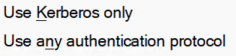
TRUSTED_TO_AUTH_FOR_DELEGATION
You will see recommendations for Set-AdAccountControl -TrustedToAuthForDelegation $true or to set delegation to Use any authentication protocol. This is not necessary for Kerberos Constrained Delegation and is NOT recommended unless you are working with services that cannot support Kerberos and you are performing a protocol transition to Kerberos (i.e. S4U2self). You will see when you should consider using this in a following section.
IIS Server
Next our IIS server configuration, on our web1 server, needs to allow the AppPool, as our AppPool identity web1gmsa, to work with Local Security Authority (LSA) rather than the local machine. This is done by setting the IIS configuration flag useAppPoolCredentials to True.
Testing
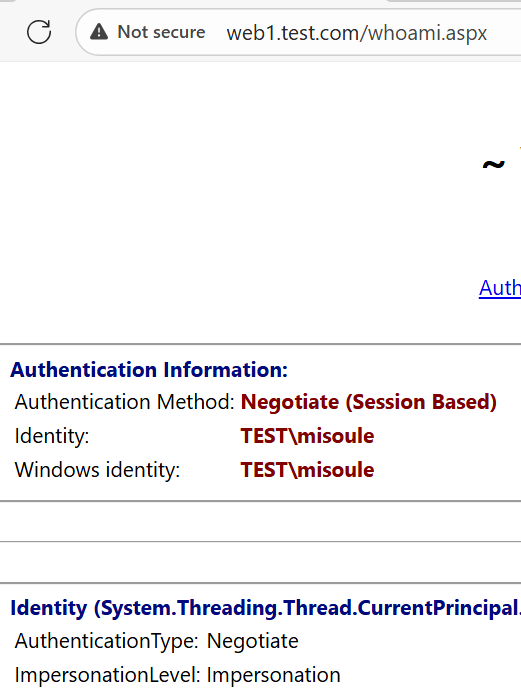
Now we can validate that we can authenticate to web2 as the user:
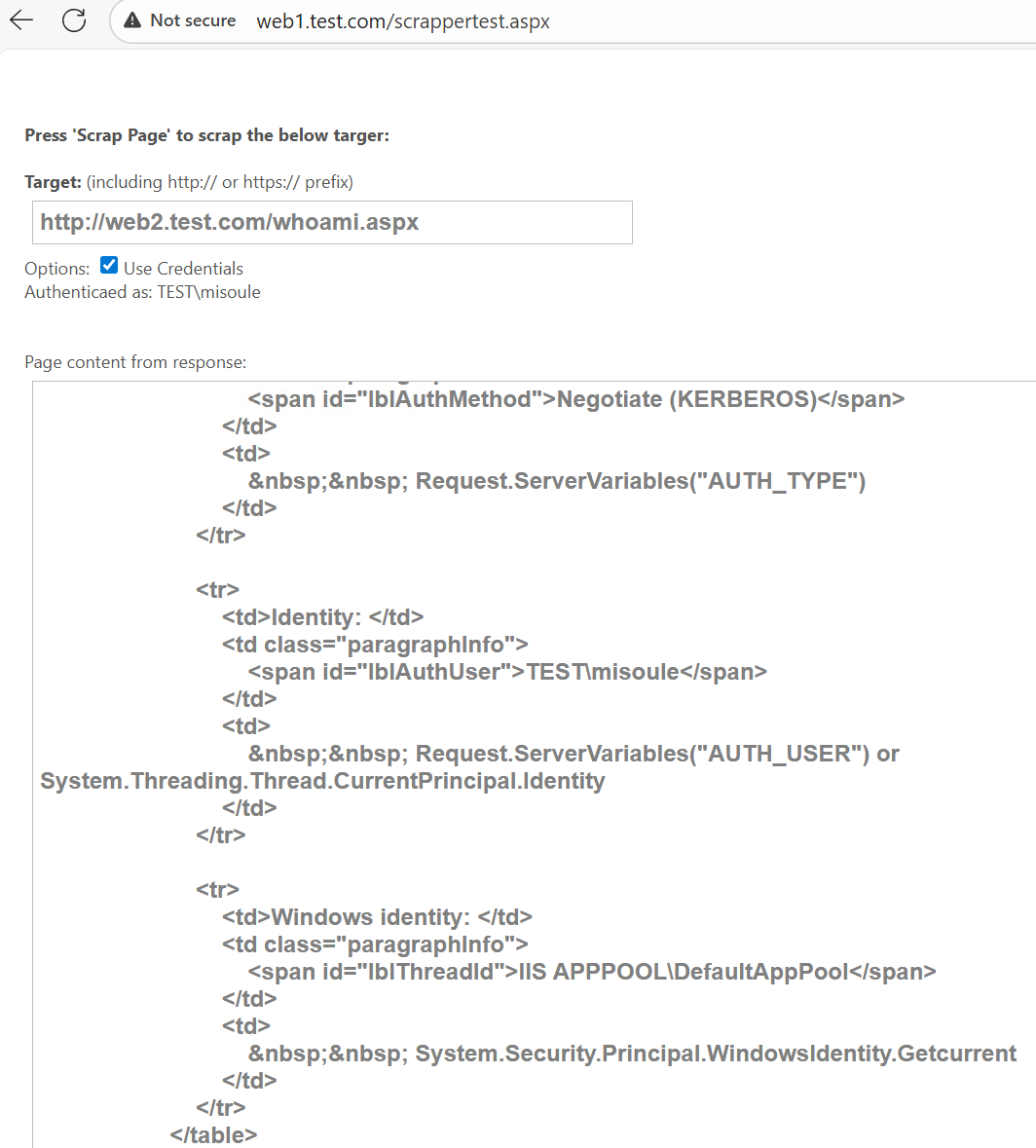
This works even though our impersonation level is impersonation:
On the client system we can also run klist to validate the Kerberos ticket works even though it does not have the ok_as_delegate flag:

Resource-based Constrained Delegation
AKA: S4U2proxy
Summary
In simple terms: “Allow this account to ACCEPT tickets from these principals.”
Don’t forget to reset everything
These steps are necessary:
- On the Domain Objects:
- Allow delegation for the account that the backend AppPool is running under, web2, for the frontend SPN, web1.
- Add an SPN to the account, web1gmsa, for the service, web1.
- On Web1:
- Configure IIS to use the app pool credentials to work with the Kerberos tickets in kernel-mode rather than the machine account.
AD Objects
The account that the service, in our case the IIS AppPool, is running as, for us this is using the web1gmsa$ gMSA account. This could also be the computer account or a normal user account depending on the IIS AppPool configuration. Configure the service account domain object:
$web1gmsaSplat = @{
  Identity = "web1gmsa$"
  ServicePrincipalNames = @{
    Add = "HTTP/web1.test.com"
  }
}

$web2Splat = @{
  Identity = "web2"
  PrincipalsAllowedToDelegateToAccount = Get-ADServiceAccount -Identity "web1gmsa$"
}

Set-ADServiceAccount @web1gmsaSplat
Set-ADComputer @web2Splat
IIS Server
Next our IIS server configuration, on our web1 server, needs to allow the AppPool, as our AppPool identity web1gmsa, to work with Local Security Authority (LSA) rather than the local machine. This is done by setting the IIS configuration flag useAppPoolCredentials to True.
Testing
Now we can validate that we can authenticate to web2 as the user:
This works even though our impersonation level is impersonation:
On the client system we can also run klist to validate the Kerberos ticket works even though it does not have the ok_as_delegate flag:
When to Use TRUSTED_TO_AUTH_FOR_DELEGATION
For Kerberos Constrained Delegation
AKA: S4U2self
Summary
In simple terms: “Allow this account to request tickets for these services on behalf of a user, even if that user didn’t originate the Kerberos ticket.”
Don’t forget to reset everything
These steps are necessary:
- On the Domain Objects:
- Allow delegation for the account that the app is running under, web1gmsa, to the backend SPN, web2.
- Allow the account that the app is running under, web1gmsa, to perform S4U2self.
- Add an SPN to the account, web1gmsa, for the service, web1
- On Web1:
- Configure IIS to use the app pool credentials to work with the Kerberos tickets in kernel-mode rather than the machine account.
- Remove Negotiate from the Windows Authentication Providers to force NTLM.
AD Objects
The account that the service, in our case the IIS AppPool, is running as, for us this is using the web1gmsa$ gMSA account. This could also be the computer account or a normal user account depending on the IIS AppPool configuration. Configure the service account domain object:
$serviceAccountSplat = @{
  Identity = "web1gmsa$"
  ServicePrincipalNames = @{
    Add = "HTTP/web1.test.com"
  }
  Add = @{
    "msDs-AllowedToDelegateTo" = @(
      "HTTP/web2.test.com"
    )
  }
}
$accountControlSplat = @{
  Identity = "web1gmsa$"
  TrustedToAuthForDelegation = $true
}

Set-ADServiceAccount @serviceAccountSplat
Set-ADAccountControl @accountControlSplat
IIS Server
Next our IIS server configuration, on our web1 server, needs to allow the AppPool, as our AppPool identity web1gmsa, to work with Local Security Authority (LSA) rather than the local machine. This is done by setting the IIS configuration flag useAppPoolCredentials to True.
We also need to remove the Negotiate Provider to ensure we are forcing NTLM authentication to web1.
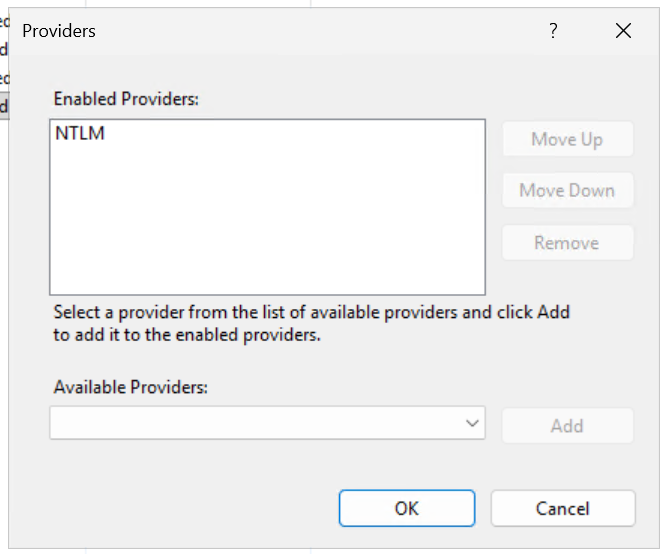
Testing
Now when we log in to Web1 we can observer that we are authenticating using NTLM.
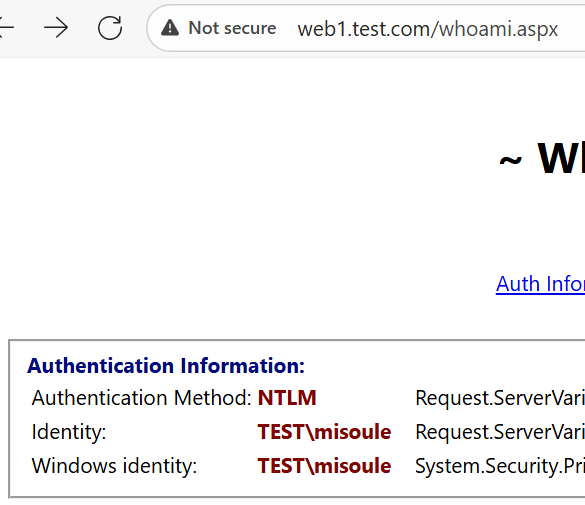
But when we then access web2 from web1, we can see that we authenticate to web2 using Kerberos.
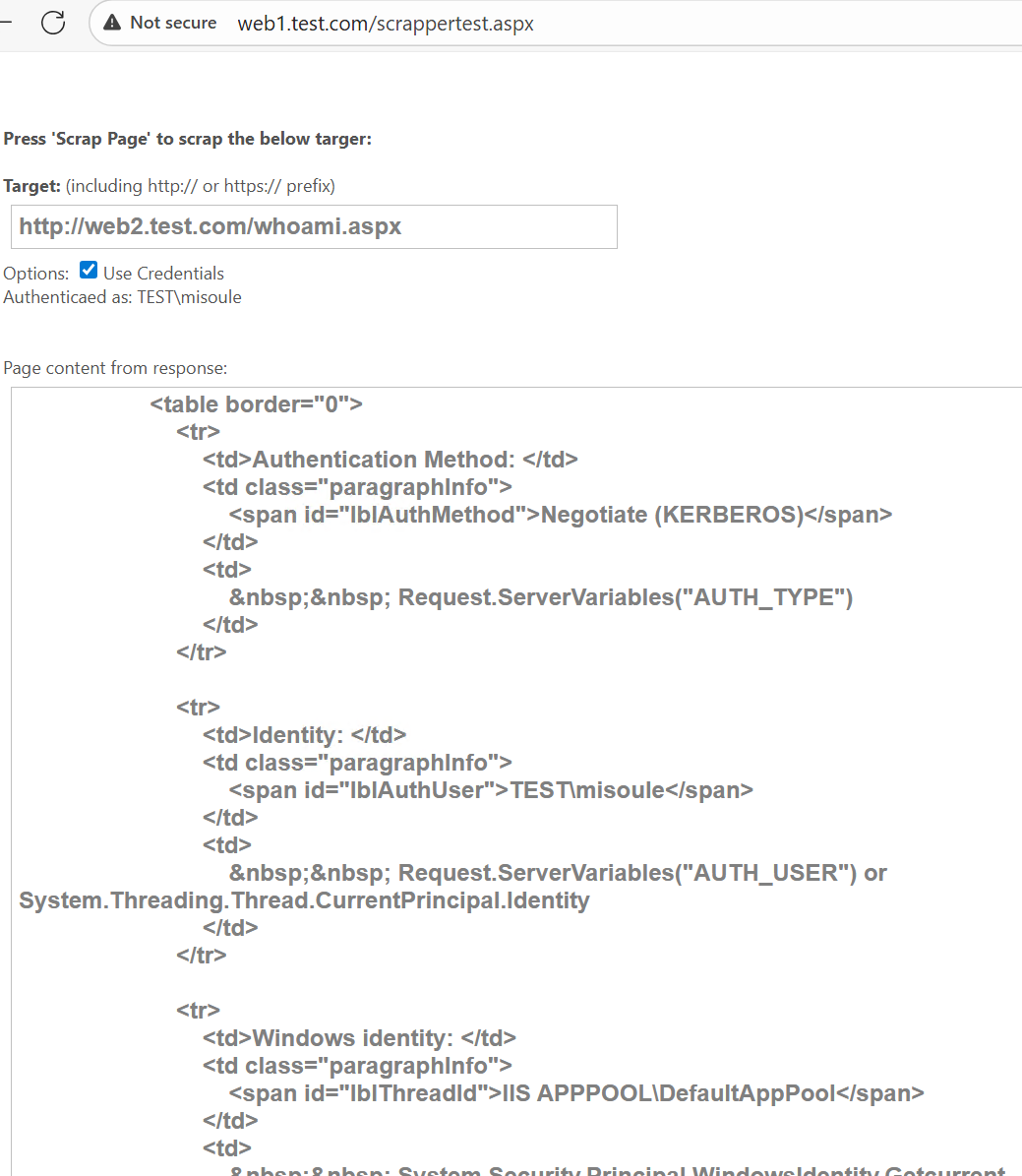
For Resource-based Constrained Delegation
With Resource-based Constrained Delegation any principal that is trusted for delegation can perform protocol transition by default. You can block that using the backend servers Local Security Policy.
Follow the same steps as in Resource-based Constrained Delegation.
Blocking RBCD from the Backend Object
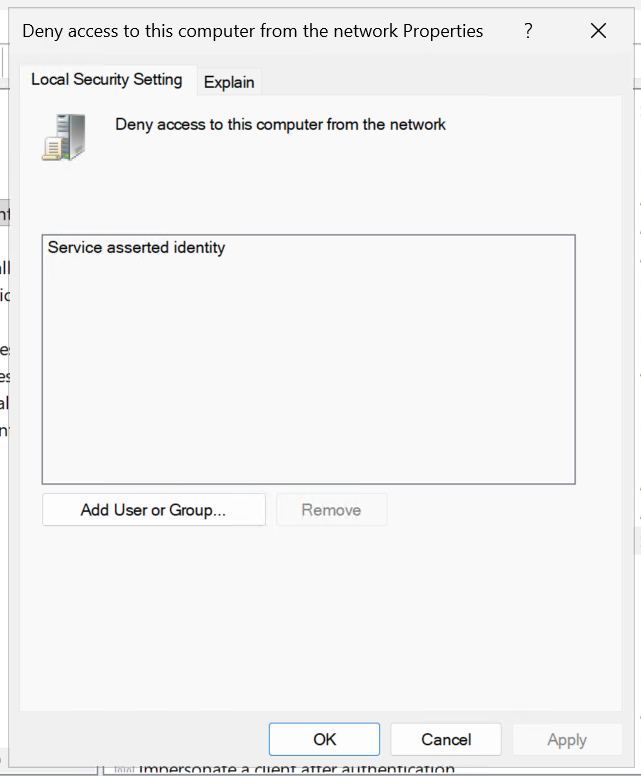
Within the Windows Local Security Policy add the well-known object Service asserted identity to the Deny access to this computer from the network policy.
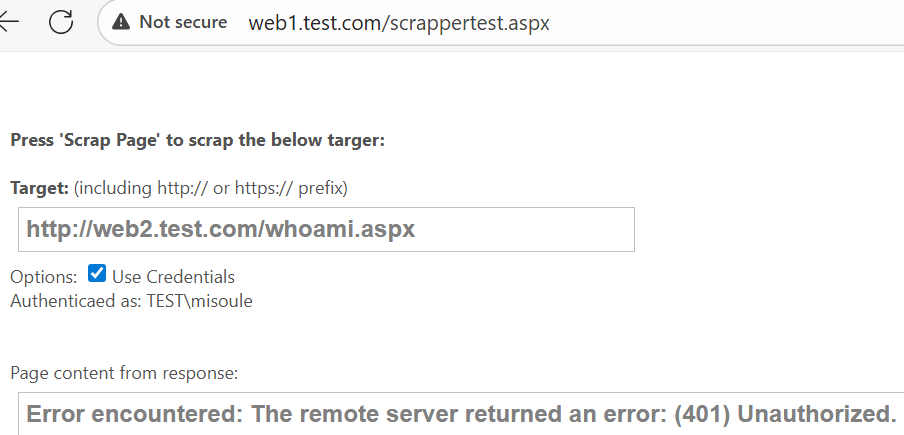
Now when you proceed to test with protocol transition from NTLM authentication to web1 using Kerberos to web2, web2 will block the authentication.
References
- https://blog.joeware.net/2008/07/17/1407/
- https://github.com/SurajDixit/KerberosConfigMgrIIS/releases
- https://learn.microsoft.com/en-us/deployedge/microsoft-edge-browser-policies/authnegotiatedelegateallowlist
- https://learn.microsoft.com/en-us/entra/identity/app-proxy/application-proxy-back-end-kerberos-constrained-delegation-how-to
- https://learn.microsoft.com/en-us/iis/configuration/system.webserver/security/authentication/windowsauthentication/
- https://learn.microsoft.com/en-us/openspecs/windows_protocols/ms-sfu/1fb9caca-449f-4183-8f7a-1a5fc7e7290a
- https://learn.microsoft.com/en-us/powershell/module/activedirectory/set-adaccountcontrol?view=windowsserver2025-ps#-trustedtoauthfordelegation
- https://learn.microsoft.com/en-us/previous-versions/office/communications-server/dd573004(v=office.13)?redirectedfrom=MSDN
- https://learn.microsoft.com/en-us/previous-versions/windows/it-pro/windows-10/security/threat-protection/auditing/event-4769
- https://learn.microsoft.com/en-us/troubleshoot/developer/webapps/aspnet/development/implement-impersonation
- https://learn.microsoft.com/en-us/troubleshoot/developer/webapps/iis/www-authentication-authorization/diagnostics-pages-windows-integrated-authentication
- https://learn.microsoft.com/en-us/troubleshoot/developer/webapps/iis/www-authentication-authorization/kerberos-double-hop-authentication-edge-chromium#how-to-know-whether-the-kerberos-ticket-obtained-on-the-client-to-send-to-the-web-server-uses-constrained-or-unconstrained-delegation
- https://learn.microsoft.com/en-us/troubleshoot/developer/webapps/iis/www-authentication-authorization/troubleshoot-kerberos-failures-ie#does-kerberos-authentication-fail-in-iis-7-and-later-versions-even-though-it-works-in-iis-6
- https://learn.microsoft.com/en-us/troubleshoot/sql/database-engine/connect/windows-prevents-unconstrained-delegation
- https://learn.microsoft.com/en-us/troubleshoot/windows-server/active-directory/useraccountcontrol-manipulate-account-properties
- https://learn.microsoft.com/en-us/windows-server/identity/ad-ds/manage/group-managed-service-accounts/group-managed-service-accounts/configure-kerberos-delegation-group-managed-service-accounts
- https://learn.microsoft.com/en-us/windows-server/security/kerberos/kerberos-constrained-delegation-overview#security-implications-of-resource-based-constrained-delegation
- https://learn.microsoft.com/en-us/windows-server/security/kerberos/kerberos-constrained-delegation-overview#what-works-differently
- https://learn.microsoft.com/en-us/windows/security/identity-protection/credential-guard/configure?tabs=reg
- https://learn.microsoft.com/en-us/windows/win32/adschema/a-spnmappings
- https://learn.microsoft.com/en-us/windows/win32/secauthn/lsa-authentication
- https://techcommunity.microsoft.com/blog/askds/kerberos-and-load-balancing/399539
- https://techcommunity.microsoft.com/blog/iis-support-blog/all-about-kerberos-%e2%80%9cthe-three-headed-dog%e2%80%9d-with-respect-to-iis-and-sql/347839
- https://techcommunity.microsoft.com/blog/iis-support-blog/service-principal-name-spn-checklist-for-kerberos-authentication-with-iis-7-07-5/347639
- https://techcommunity.microsoft.com/blog/iis-support-blog/setting-up-kerberos-authentication-for-a-website-in-iis/347882